|
|
|
0 members (),
2,641
guests, and
24
robots. |
|
Key:
Admin,
Global Mod,
Mod
|
|
S |
M |
T |
W |
T |
F |
S |
|
|
|
|
1
|
2
|
3
|
4
|
|
5
|
6
|
7
|
8
|
9
|
10
|
11
|
|
12
|
13
|
14
|
15
|
16
|
17
|
18
|
|
19
|
20
|
21
|
22
|
23
|
24
|
25
|
|
26
|
27
|
28
|
29
|
30
|
31
|
|
|
There are no members with birthdays on this day. |
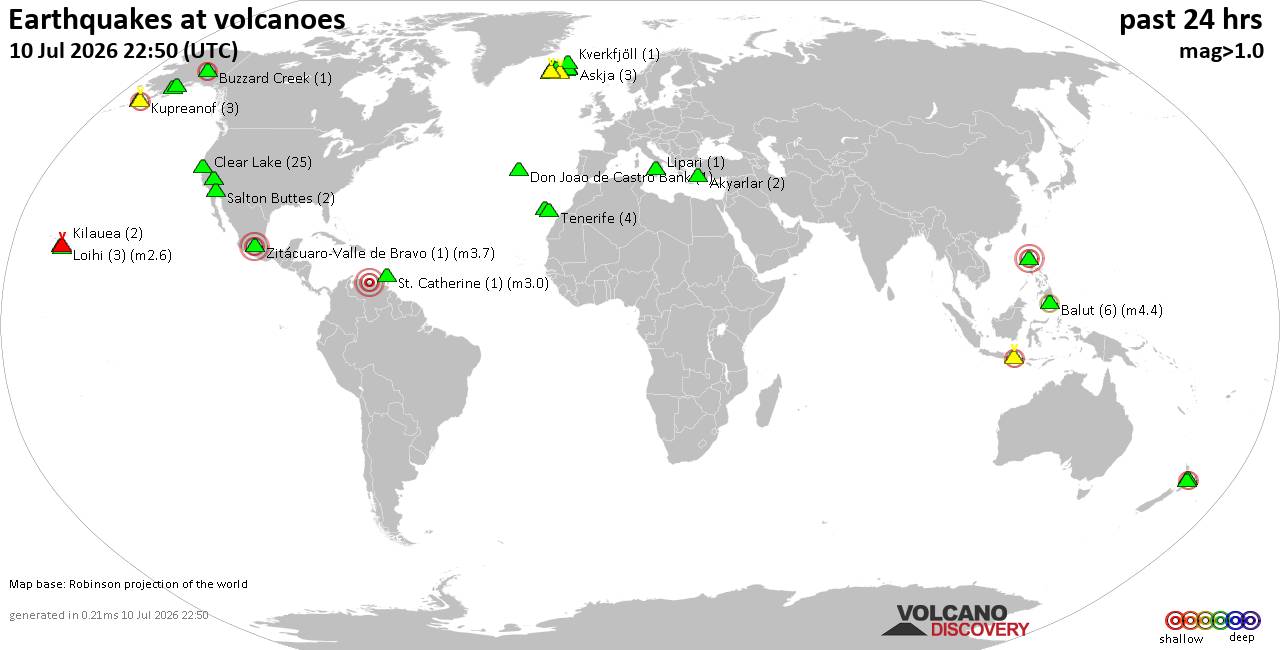
Volcano earthquake report for Friday, 10 Jul 2026
• Moderate mag. 4.2 earthquake - 133 km northwest of Ternate, Kota Ternate, N...
• World Earthquake Report for Friday, 10 July 2026
• Moderate mag. 4.6 earthquake - 17 km southwest of Comalapa, Estado de Chiap...
• Moderate mag. 4.1 earthquake - Olyutorskiy Rayon, 47 km northwest of Tilich...
• Moderate mag. 4.0 earthquake - Hawke's Bay, New Zealand, on Saturday, Jul 1...
|

#619110
Wed 08 Sep 2021 02:30:PM
|
Joined: Feb 2001
Posts: 678,976
Launch Director
|
OP

Launch Director
Joined: Feb 2001
Posts: 678,976 |
The Command Prompt app has been around since December 1987, providing Windows users with a command-line interface from which to execute operating systems tasks, many of which are very useful. Due to its popularity, Microsoft has made the app easily accessible on Windows 10, in more ways than one.
Here are 11 ways to open Command Prompt.
Open Command Prompt from the search bar
You can search for any app using the Windows search bar, and the Command Prompt is no exception. First, type Command Prompt in the Windows search bar in the bottom-left corner of your screen, and then click the Command Prompt app in the search results, or click “Open” in the list of options to the right of the search results. To read this article in full, please click here Source: 11 ways to open Command Prompt in Windows
|
|



CMS The Best Conveyancing solicitors conveyancing quotes throughout the UK
For any webhosting enquiries please email webmaster@aus-city.com
|
|
Entire Thread
|
 11 ways to open Command Prompt in Windows
|
Webmaster
|
Wed 08 Sep 2021 02:30:PM
|
|
Forums60
Topics789,850
Posts824,628
Members2,960
| |
Most Online102,106
Jul 10th, 2026
|
|
|
|
|
Copyright 1996 - 2026 by David Cottle. Designed by David Bate Jr. All Rights Reserved.
By using this forum, the user agrees not to transfer any data or technical information received under this agreement to any other entity without the express approval of the AUS-CITY Forum Admins and/or authors of individual posts (Forum Admins and DoD/USSPACECOM for the analysis of satellite tracking data).
Two-line elements (TLE) and all other satellite data presented and distributed via this forum and AUS-CITY mailing lists are distributed with permission from DoD/USSTRATCOM.

|

|