|
|
|
0 members (),
989
guests, and
25
robots. |
|
Key:
Admin,
Global Mod,
Mod
|
|
S |
M |
T |
W |
T |
F |
S |
|
|
|
|
|
1
|
2
|
3
|
|
4
|
5
|
6
|
7
|
8
|
9
|
10
|
|
11
|
12
|
13
|
14
|
15
|
16
|
17
|
|
18
|
19
|
20
|
21
|
22
|
23
|
24
|
|
25
|
26
|
27
|
28
|
29
|
30
|
31
|
|
There are no members with birthdays on this day. |
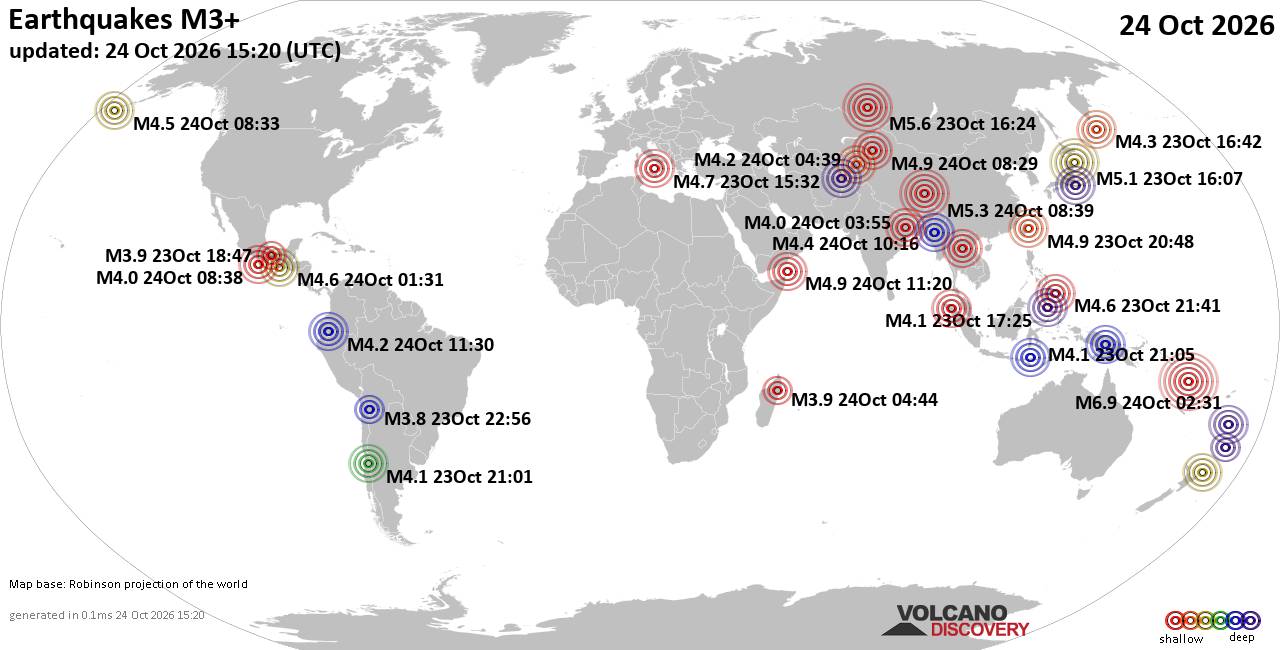
World Earthquake Report for Saturday, 24 October 2026
• M 2.1 - 5 km SW of Anza, CA
• M 0.8 - 9 km NNE of Indio, CA
• M 1.0 - 2 km NW of Banning, CA
• M 0.8 - 7 km WNW of Cobb, CA
• M 4.4 - 42 km ESE of Juradó, Colombia
|

#594607
Thu 04 Feb 2021 11:30:AM
|
Joined: Feb 2001
Posts: 678,977
Launch Director
|
|
Launch Director
Joined: Feb 2001
Posts: 678,977 |
Until now, uploading photos on your Android phone has seemed like a perfectly good idea. But beginning in June, 2021, that decision is going to hit you right in the pocketbook, as Google begins to enforce its new storage policy. Blocking photos from uploading to Google Photos, as weird as it sounds, will eventually save you money.
Let us explain. If you take a photo on an Android phone, it automatically uploads itself to the Google cloud, where it’s stored in perpetuity. Today, those photos are stored in what Google calls “high resolution†by default—something close to the original resolution you shot. To read this article in full, please click here Source: Fight Google's data cap with a simple change to Google Photos
|
|



CMS The Best Conveyancing solicitors conveyancing quotes throughout the UK
For any webhosting enquiries please email webmaster@aus-city.com
|
|
Entire Thread
|
 Fight Google's data cap with a simple change to Google Photos
|
Webmaster
|
Thu 04 Feb 2021 11:30:AM
|
|
Forums60
Topics892,234
Posts927,031
Members2,960
| |
Most Online102,106
Jul 10th, 2026
|
|
|
|
|

|