|
|
|
0 members (),
1,076
guests, and
16
robots. |
|
Key:
Admin,
Global Mod,
Mod
|
|
S |
M |
T |
W |
T |
F |
S |
|
|
|
|
|
|
|
1
|
|
2
|
3
|
4
|
5
|
6
|
7
|
8
|
|
9
|
10
|
11
|
12
|
13
|
14
|
15
|
|
16
|
17
|
18
|
19
|
20
|
21
|
22
|
|
23
|
24
|
25
|
26
|
27
|
28
|
29
|
|
30
|
31
|
|
|
|
|
|
|
There are no members with birthdays on this day. |
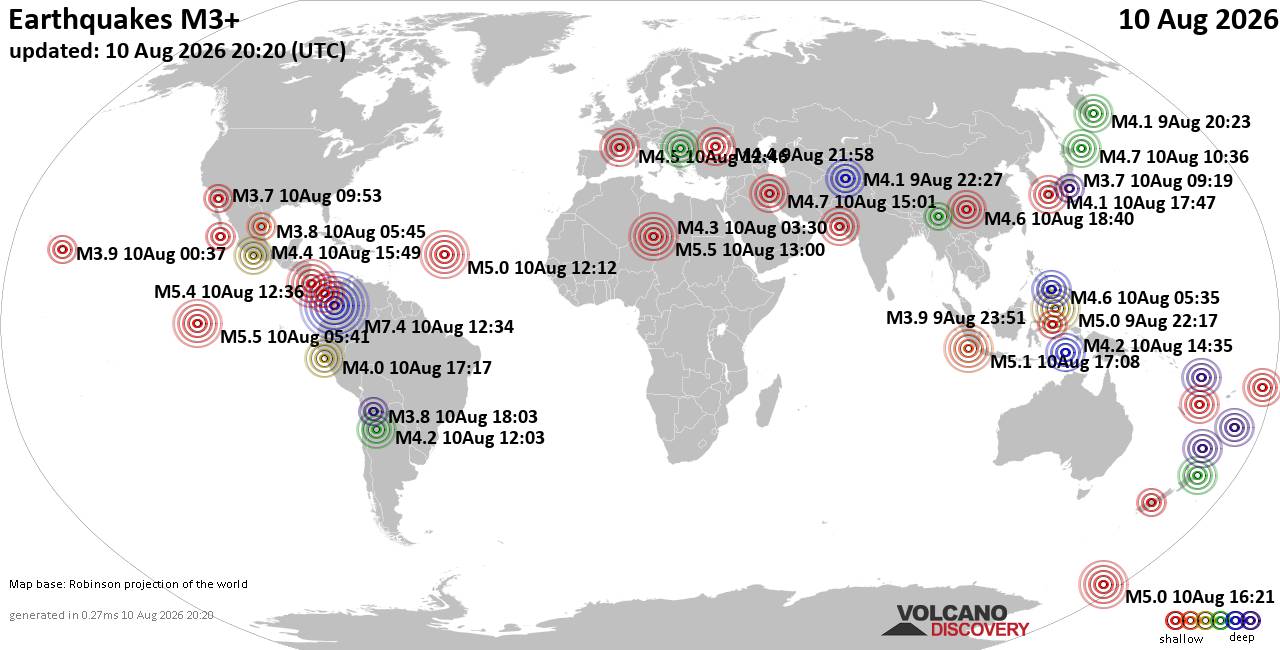
World Earthquake Report for Monday, 10 August 2026
• Volcano earthquake report for Monday, 10 Aug 2026
• Moderate mag. 4.0 earthquake - Zangilan Rayon, 58 km southwest of Ganja, Ga...
• Moderate mag. 4.6 earthquake - 31 km northeast of Xunchang, Sichuan, China,...
• Moderate mag. 4.2 earthquake - New Zealand on Tuesday, Aug 11, 2026, at 06:...
• World Earthquake Report for August 2026
|

#528894
Mon 21 Oct 2019 04:00:PM
|
Joined: Feb 2001
Posts: 678,976
Launch Director
|
OP

Launch Director
Joined: Feb 2001
Posts: 678,976 |
Eliminating your login password from your PC is a bad idea—unless you own a computer that no one but you will ever touch. In that case, why not remove your password and eliminate that initial step?
In the past, we’ve discussed getting rid of the Windows 10 password by tinkering with Windows’ power settings. There’s a better way to remove the password entirely, however, so that you’ll never need to enter it. We’ve tested this with Windows 10 Pro and Windows 10 Home, and it’s worked using the Windows 10 October 2018 Update and the Windows 10 May 2019 Update. (There’s no reason to believe it won’t work on subsequent updates, either.) To read this article in full, please click here Source: How to remove your login password from Windows 10
|
|



CMS The Best Conveyancing solicitors conveyancing quotes throughout the UK
For any webhosting enquiries please email webmaster@aus-city.com
|
|
Forums60
Topics796,363
Posts831,153
Members2,960
| |
Most Online102,106
Jul 10th, 2026
|
|
|
|
|

|