|
|
|
1 members (Alisa),
2,786
guests, and
22
robots. |
|
Key:
Admin,
Global Mod,
Mod
|
|
S |
M |
T |
W |
T |
F |
S |
|
|
|
1
|
2
|
3
|
4
|
5
|
|
6
|
7
|
8
|
9
|
10
|
11
|
12
|
|
13
|
14
|
15
|
16
|
17
|
18
|
19
|
|
20
|
21
|
22
|
23
|
24
|
25
|
26
|
|
27
|
28
|
29
|
30
|
|
|
|
|
There are no members with birthdays on this day. |
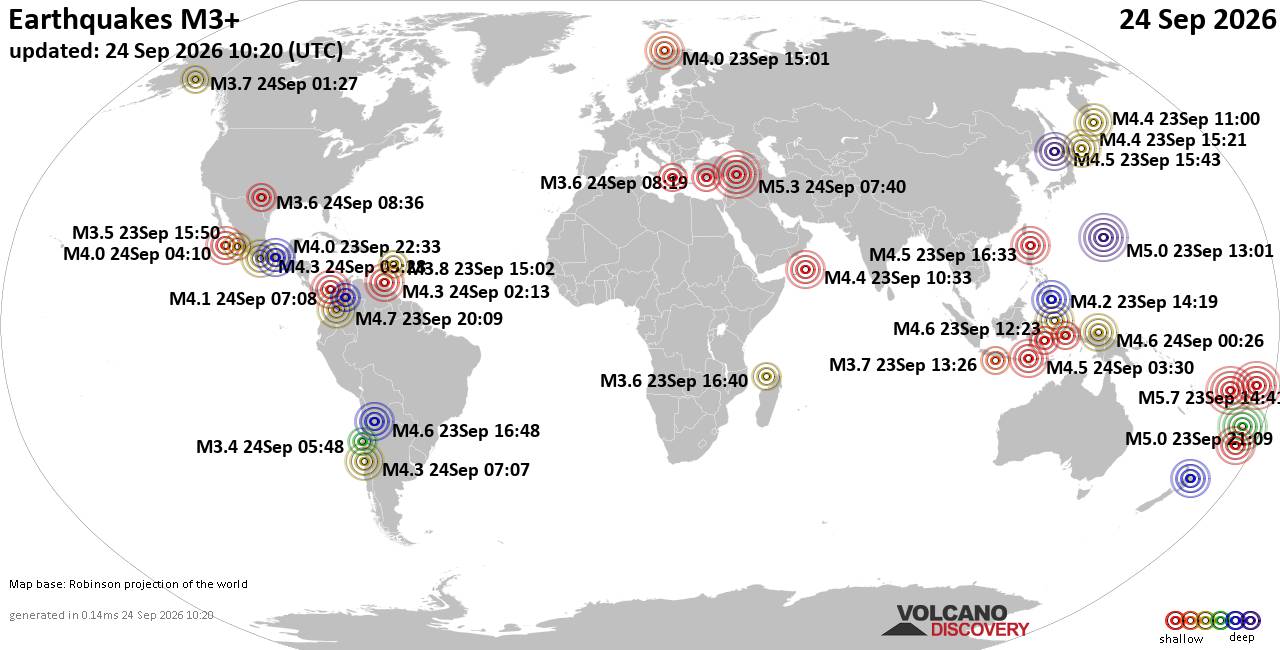
World Earthquake Report for Thursday, 24 September 2026
• Moderate mag. 4.3 earthquake - Madagascar: Mozambique Channel on Thursday, ...
• Small magnitude 3.9 earthquake hits near Hastings, Hastings District, Hawke...
• Volcano earthquake report for Thursday, 24 September 2026
• Light mag. 3.9 earthquake - South Pacific Ocean, 10.2 km south of Hastings,...
• Moderate magnitude 4.1 quake hits 31 miles southeast of Midland, Texas, Uni...
|

#678692
Tue 13 Dec 2022 10:10:PM
|
Joined: Feb 2001
Posts: 678,977
Launch Director
|
|
Launch Director
Joined: Feb 2001
Posts: 678,977 |
THIS GAME (F122) IS IMPOSSIBLE TO PLAY!!!!!!!!Product: F1 22
Platform:PC
Summarize your bug F1 22 crash/freeze in many ways: 1) after finish loading the track; 2) while I am in the main menu of the game; 3) after the track has finish loading and I am in the cockpit cam before starting the race; 4) after I finish the race, while statistics appear on screen; 5) when I use Alt+Tab to go to my desktop. I have the same problem in F1 2021 (in F1 2019 and F1 2020 is OK). I need to reinstall Windows 10 to resolve the problem in F1 22. But after 2-3 weeks the PROBLEM APPEAR AGAIN. Everything is updated. The reinstalling of f1 22 and Steam is useless.
What is your 16 digit Report Code? KRSE-THPR-BPAT-DJTE; XEMH-BJBJ-TDHB-DKSE; MVEH-CPMC-JKAT-DRVE; AMMG-DVVX-DMTK-EHTE
Which area is the bug/glitch in? My Team
How often does the bug occur? Every time (100%)
Did you have cross-play enabled? Yes
Steps: How can we find the bug ourselves? I don`t know. I have Windows 10 / I7 9700 / 16gb RAM - 2666 mhz / GTX 1660Super and the game is installed on HDD. NVIDIA driver 526.98
What happens when the bug occurs? After F1 22 crash: sometimes my GPU and the integrated Intel graphics disappeared from task manager. Steam not responding and I must to end task and re-open again. Also sometimes I need to force end-task explorer.exe and restart again.
What do you expect to see? I expect to play the game normally without crashing/freeze and when I want to make a small pause - to be able to switch to My computer (Alt+Tab) and after to go back to my game. ‌ Gathering crash info...
Gathering crash info...
MiniDumpWriteDump failed: The paging file is too small for this operation to complete.
Preparing ZIP file...
Report code: KRSE-THPR-BPAT-DJTE
C:\Users\vladm\AppData\Local\Temp\939134-20221210-003915-0.zip
Gathering crash info...
Gathering crash info...
Preparing ZIP file...
Report code: XEMH-BJBJ-TDHB-DKSE
C:\Users\vladm\AppData\Local\Temp\939134-20221210-214248-0.zip
Gathering crash info...
Gathering crash info...
Preparing ZIP file...
Report code: MVEH-CPMC-JKAT-DRVE
C:\Users\vladm\AppData\Local\Temp\939134-20221210-215454-0.zip
https://answers.ea.com/t5/Technical-Issues-Bug-Reports/THIS-GAME-F122-IS-IMPOSSIBLE-TO-PLAY/m-p/12127109#M12671
|
|



CMS The Best Conveyancing solicitors conveyancing quotes throughout the UK
For any webhosting enquiries please email webmaster@aus-city.com
|
|
Forums60
Topics840,505
Posts875,300
Members2,960
| |
Most Online102,106
Jul 10th, 2026
|
|
|
|
|

|