|
|
|
0 members (),
1,802
guests, and
27
robots. |
|
Key:
Admin,
Global Mod,
Mod
|
|
S |
M |
T |
W |
T |
F |
S |
|
|
|
|
|
1
|
2
|
3
|
|
4
|
5
|
6
|
7
|
8
|
9
|
10
|
|
11
|
12
|
13
|
14
|
15
|
16
|
17
|
|
18
|
19
|
20
|
21
|
22
|
23
|
24
|
|
25
|
26
|
27
|
28
|
29
|
30
|
31
|
|
There are no members with birthdays on this day. |
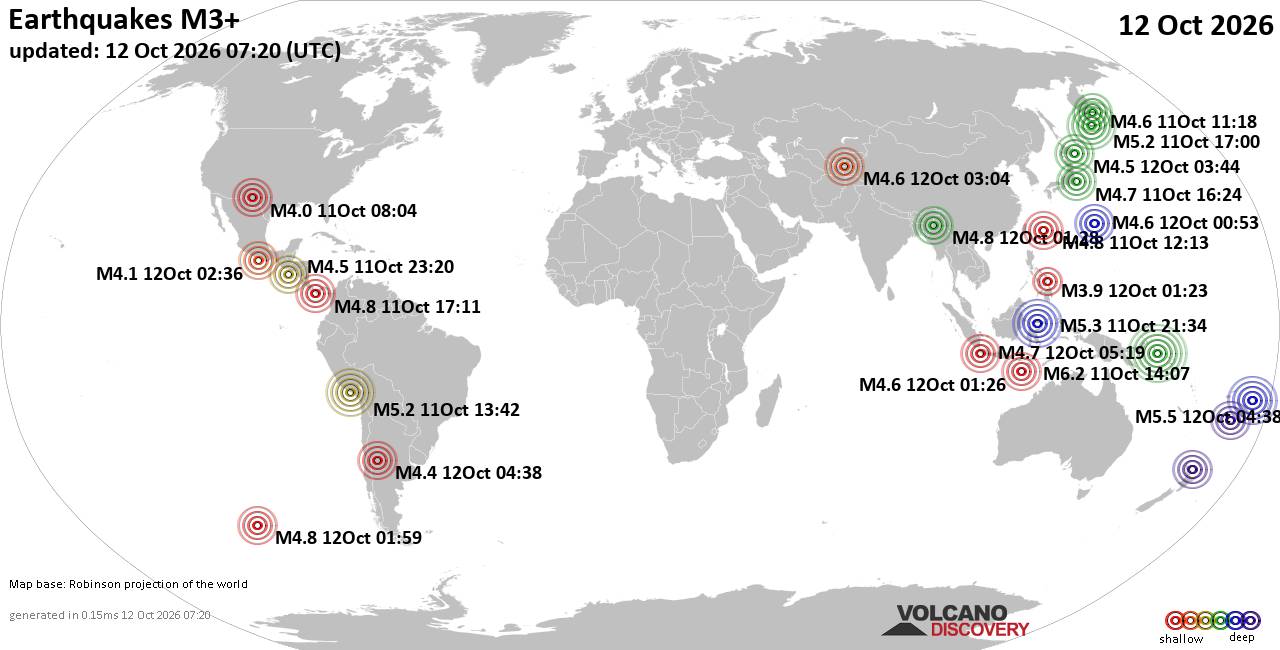
World Earthquake Report for Monday, 12 October 2026
• M 2.2 - 16 km ESE of Pearsall, Texas
• M 2.5 - 63 km SSE of Perryville, Alaska
• M 5.5 - 122 km W of Neiafu, Tonga
• M 2.0 - 10 km W of Boonville, CA
• M 1.8 - 9 km SSW of Pāhala, Hawaii
|
|
|
Joined: Dec 2002
Posts: 95,830
Launch Director
|
|
Launch Director
Joined: Dec 2002
Posts: 95,830 |
The difference between Viewing and ScalingWhen viewing an image on your computer you can "view" it larger or smaller without changing the actual "size" of the image. They look larger, but that is just using the magnifying  feature to have a closer look. To change the actual size you either "resample" the image to a new size or you "scale" the image (whichever term your program uses). When you scale your image, you are making it physically larger or smaller. For example, here is an image at 311 x 320 pixels/dots (width x height).
![[Linked Image from metawake.info]](http://www.metawake.info/images/art/alien_circle_patch.jpg)
To make it smaller, I then scale or resample this image to 150 x 154 px (which is approximately 50% of the original size). You can scale by pixel or percentage.
![[Linked Image from metawake.info]](http://www.metawake.info/images/art/alien_circle_patch2.jpg)
Ask more questions and I'll give more answers and examples! 
|
|



CMS The Best Conveyancing solicitors conveyancing quotes throughout the UK
For any webhosting enquiries please email webmaster@aus-city.com
|
|
Forums60
Topics870,219
Posts905,015
Members2,960
| |
Most Online102,106
Jul 10th, 2026
|
|
|
|
|

|